

We improve Comuniate comments: share your lineup and solve your fantasy doubts

Comuniate's comment system rolls out major improvements to make participation for all users much easier and more visual. From now on, you will be able to share your lineup directly in the comments, show your template, and ask for help with signings, sales, or decisions for your starting XI.

A new design to share your fantasy questions
Over the past few days, we have been working on a renovation of the Comuniate comment system, aiming to make it more convenient, visual, and useful for all users.
Comments are still one of the meeting points in our community to talk about lineups, signings, sales, recommended players, or last-minute doubts, but now we want to make it even easier to do so.
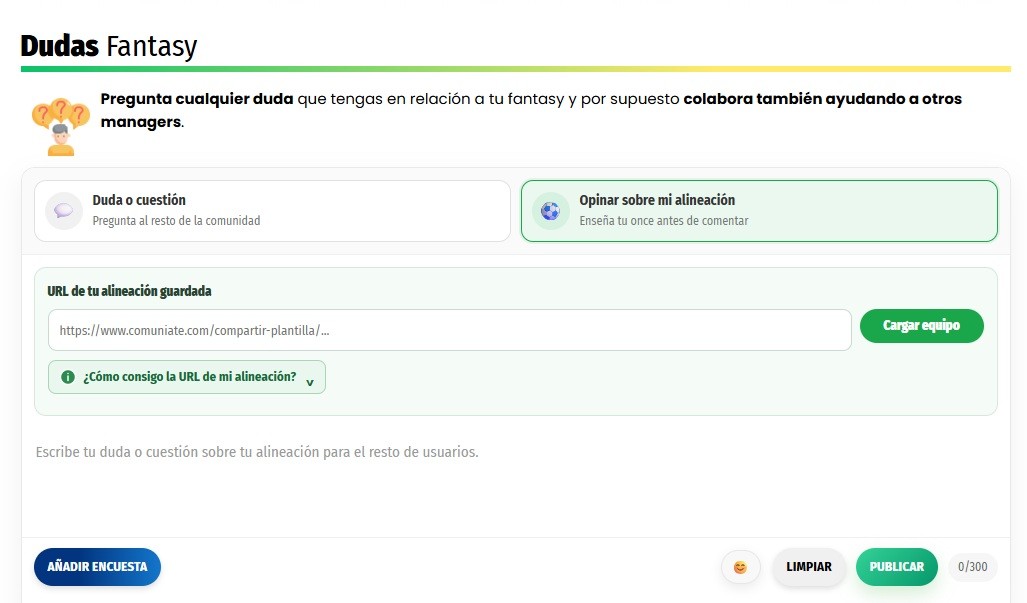
The main new feature is that you can now share your own lineup within the comments, allowing other users to see it quickly and help you without having to write out every player from your team one by one.
Check the full template and other users' starters
When a user shares their team, you will be able to access their template and check in a much more visual way which players they have available and which ones are part of their starting XI.
This makes it much easier to answer common questions like:
- “Who would you put in this matchday?”
- “Would you sell this player to sign someone else?”
- “What would you change in my lineup?”
- “Which of these forwards would you go with?”
Instead of trying to explain your entire template through text, you will be able to show your team directly and give the rest of the users all the information they need to help you.
How to share your lineup in the comments?
The process is very simple.
First, you need to access our lineup help tool. Once inside, you will have to fill in your template by adding the players you have available and selecting the footballers that make up your starting XI.
When you have your lineup ready, you simply need to share it from within the tool itself.
A unique address will be generated for your team. Now you just need to go to the comments, indicate that you want others to weigh in on your XI, and paste the address you obtained in the previous step into the URL field, then click Upload team. That's it, just that easy.
Once you publish it, the rest of the users will be able to open your lineup, easily check your full template and your starters, and answer your question with a much clearer view of your team.
Easier to ask... and also to help
This improvement is not only intended for those who want to resolve a doubt. It also makes much easier the task for users who habitually help other community members.
It will now be possible to analyze a template quickly, check the available alternatives, and recommend changes without having to constantly ask for additional information about which players each user has.
We want Comuniate comments to be increasingly a space where we share opinions, debate signings, and help each other prepare our fantasy lineups.
We keep improving Comuniate
This new system is part of the improvements we are rolling out this season to make the experience within Comuniate faster, more visual, and more participatory.
Try the new system now, share your lineup in the comments, and let the community help you with your fantasy decisions.
Follow all the fantasy information on our WhatsApp channel
Recent Post